Wednesday, November 20, 2013

TOR project


       Today i'm going to talk about the Tor project and what it is.  The tor project is a free software that allows for online anonymity.  What Tor does is that it makes network tracking difficult.  The data and its destination are encrypted and re-encrypted multiple times and then sent through a random path randomly by one of the TOR relays. 
Tor homepage
  Tor stands for the "The Onion Routing".  Tor's purpose is to hide their user's ID and network activity from tracking.  TOR software runs a onion proxy on their user's computers that periodically negotiates a vital circuit through the TOR networks.  

That's my little thing on how the TOR project works, if you want to know more then just go to torproject.org or google it for more info.


RSS Sites


     Today i'm going over two RSS news reader sites that may interest some people.  These sites are free to use and are very simple to use.  Now for those that don't know what a RSS news reader site is, its a thing that lets you check to see if a site has updated anything recently by showing a small tid-bit paragraph from each site.


Feedly 
    Feedly is one of those news reader site.  Feedly lets you see you sites that you normally visit but without having to go to every site individually, but instead has all your sites in a list and shows small exempts from each site whenever new content goes up.  Feedly would probably be better if you use it on your phone or tablets and really I just favorite all my site so its easy finding for everything.


News360
   News360 is another RSS site reader and it too bad at it.  News360 lets you pick from a list of sites taht they have listed for you to pick, or you can pick a category which comes with a wide range of sites.  Also News360 lets you favorite articles and that you may have liked or want to finish reading.  The only complaint I could find was that I couldn't pick a site that I wanted personally but instead a list of sites it gives me,but it is a news reader and it does show news quite well. Besides that I find it more flashier than Feedly and do like its layout somewhat better.


So there's two free RSS site that you can use at will (might use them to find new sites to read) ,but like I said favoring site with your browser is better in my opinion. Well that's all and thanks for reading, you poor souls.


Tuesday, November 19, 2013

Image Distribution Sites

     Today i'm going to talk about some Image distribution sites.  These sites are free to use and can be used to share pictures with the internet or to get pictures from the internet without google and fear of copyrighting.


Flickr

       Flickr is the first site on thew list to go over.  Its very simple of how it works and can used by anyone.  To upload pics you just drag and drop then add.  If you want to get pics and link them to your blog just go to share and on the pic and get either the whole html code or just the link.


Dropbox
       Dropbox is the next site on the list that lets you share and distribute pictures on the web.  Now dropbox works like Flickr in terms of the way it distributes images.  Another thing that Dropbox also does is that it lets you share your stuff across multiple computers and devices.  Like I said dropbox is quite like Flickr in terms of how you distribute your image.


Photobucket

    Photobucket compared to the other two is much more better.  You can do alot more things with photobucket than the other two sites like; backing up your stuff, add videos and more stuff for your own personal use or to distribute.  Dropbox allows some of these features too like photobucket.  The html link for the picture on this one is a little different compared to the other two, but is easier than the other two since it has the link address to the side clearly labelled next it html. 


 photo peanut4jpg_zps0b1752da.jpg
(here is a picture i used to by using the site)

(this is photobucket)

Tuesday, November 5, 2013

DIY (Do It Yourself)

   
     Today i'm going to show everyone cool stuff that they can make on their own with a little time and possibly with very little cash.  Also i'm going with a more medieval themed type of projects.

     First up is a crossbow, so who doesn't want a crossbow?  Crossbows can be used for many things, defending a castle wall, shooting apples, intimidation, and annoying friends or co-workers.  Like this paper crossbow made out of things that you might have lying around your house doing nothing, http://www.instructables.com/id/Paper-Crossbow-6/?ALLSTEPS this crossbow by trek800 on instructables.com.  Now this crossbow has six easy steps and by the way it looks can be done by anyone and with stuff that your more than likely to have laying around the house.  So its a easy crossbow to make and can be fun for anyone.
Picture of Paper Crossbow
(the finished project)
The items that will be needed for this project
9 sheets of paper
4 Popsicle sticks
a marker
tape
sciccors
a ruler


    Next up is your catapult, because you always need to knock down something and a catapult is one of your best options.  Now this catapult,  http://www.instructables.com/id/Desktop-Popstick-Catapult/?ALLSTEPS by fork me3 on instructables.com, is a little more complex than the crossbow but still has very easy to follow steps and can be made without spending too much money.  the catapult itself is only desktop size and can be fit anywhere for any castle or face destruction. 
(the finished project)
The items that will be needed for this project
some Popsicle 
a pen
a ruler
hot glue gun
scissors
kebab stick
pair of pliers
twine or string
metal wire(coat hanger)
lighter
rounded top screw]\


     Lastly is your main weapon of choice and your weapon to fall back on when you're screwed, is the sword.  Now your sword can be anything like a broadsword, claymore, dagger, katana or whatever.  Instead i'm showing you this, http://www.instructables.com/id/Skyrim-Dragonbone-Sword/?ALLSTEPS by blackbeltmikey on instructables.com.  Now this sword is off Skyrim and I like skyrim alot and your sword just needs to be anything really.  Now this sword is easy enough to make and like everything doesn't require you to buy that much of anything but really cheap and easy stuff from walmart or any dollar store, and will give you enough fun for your time, money, and effort.


(finished project)
The items that will be needed for this project
hot wire cutter
glue gun
wet and dry paper
paint brushes
styrofoam of at least 25mm size
PVA glue
newspaper
masking tape


       Now that i've showed you three awesome cool things that you can build on your own with friends or family and with little money.  You can go out and make these things and have lots of fun and be sure to thank the people who made these things on instrucables.com.

Thursday, October 31, 2013

How Google has changed the world.....according to me.


     Google has changed the world a lot, well not the world but the internet and how we use it.  Google was and is the answer to searching the internet and doing it more effectively and with less problems unlike Yahoo and other search engines.  Google has been around since 1996 as a private research project in Stanford.  In 1998 Google went full and public through the internet and quickly became very popular search engine provider.
     Now Google offers many different things than just being a search provider.  Google offers many things like Gmail, Blogger, Google Plus, Google Maps, Google Drive, and other little things.  The best thing about it is you make one account for one of those things and it makes accounts for the other things they offer.
    Google is also a competitor to other companies that offer similar things like Yahoo and Microsoft's Bing.  There are other search engine providers out there that offer free services and some of them are actually very good competitors.
(Google's homepage as of Halloween 2013)

     Some of my complaints about Google is that they like to change things a lot. As of now one of the things they just changed is the way you log into Gmail now is no longer as fast as it once was, now it takes you to a site then you gotta click again to go to the gmail Login.
     The main thing though about this blog is abut how Google has changed everything and how easily its made things to find.  If you want to know where to find anything or how to do something, you go to a computer and then you google it.  Google has gotten that big that its a part of our everyday life now.
(Google in use)
   
   So its very amazing how something like Google started as a school project and then continued out of a basement into a corporate business like it is now.

Tuesday, October 22, 2013

photo editing sites


 Photo Editing Sites
    Today I'm going to show you some free Photo editing software that you don't have to download on to your computer.  These sites are very easy to use and the best thing is they're free.


  Photoshop express
   Photoshop express is very much photoshop for free with almost everything that actual photoshop has to offer.  Express is very easy to use compare to its actual version,  it seemed that anyone with some knowledge of computers could easily work it out just fine especially for someone like me that has already used photoshop.  It also lets you edit your photos from you computers so can get rid of that red-eye from your family picture.
As you can see the layout is very simple and it neatly displays what tools you can use at the side and also displays setting for those tools at the top.

    All in all photoshop express is a great thing to use if you don't have the money to buy photoshop for your own use.

Befunky.com
   Befunky is another free photo editor that doesn't need downloaded to your computer to be used and like stated already(YAY! redundancy!!)its free.  Now Befunky is similar to Photoshop in only a few ways.  Befunky has filters that you can select from to give cool effects to your photos.  
                                                                                 
As you can see Befunky is simple to use and has a user-friendly setup.

     Now the thing that makes Befunky stand out is its collage maker.  Befunky allows you to upload your photos and make a collage out of them.
As you can see its very easy to use and you can go by there default templates or make your own.

         One cool thing you could do with Befunky and Photoshop express is, pull the photo through express and edit it to look the way you want it, then take it to befunky to give it a cool filter and put it in a collage.


Picmonkey.com
       
      Picmonkey is another free photo editor website. Now Picmonkey is great or what it does, but seeing it and after viewing Photoshop Express and Befunky its nothing stellar.  Now the one thing I think that Picmonkey does best and better is their effects options.  
As you can see the effects look very nice through their filters.  Using dusk and cross process I made a very cool old timey pictures.

    Now picmonkey's UI is friendly to use, but can take some time to learn where everything is since its all under tabs.  Now one cool thing they're doing is the Halloween specials where can use on your self into a undead fiend for October 31st.

Sumopaint.com
       Now sumopaint is another photo editor.  It looks like paint in a lot of ways and some of photoshop in my opinion.  Now sumopaint isn't that user friendly and takes time to learn what you're doing and how to do it, but watching the video they have for it and some youtube searches can help you get speed.  Now sumopaint has alot of stuff on it that i'm only going to cover a little bit of it.  You have you simple paint setup on the side.                                                               
     Now the best stuff is up top that has all your filters and options for your tools.  Sumopaint is a very good editor and can be rewarding once you learnt its controls.


psykopaint.com 
   Psykopaint is the last one this list and the most unique editor here.  Psykopaint lets you paint over your pictures to make you pictures in paint form.  Now it can be confusing at first, but watch the video and youtube and you'll be up to speed in no time.  
(behold my awesome art skills :p)
     Now i'm no good at this, but i'm quite sure someone else can use this better then me.  Now it UI is very easy to use and it lets you change your brush style to a selected style they have available.  


      These are some of the free photo editing sites.  You can use these as free alternatives and to keep from downloading programs onto your computer or having to pay for services.  You can use these site whenever and however you want and can even combine them to make better.


Thursday, October 10, 2013

Free Software

   Today i'm going be talking to everyone about three lovely free programs that you can get for your computer to help with your computer needs or make it a a big waste.

Steam

      Steam is a program that lets you buy and download games for your computer.  The whole process is digital so it involves no disks and means it take time for your games to install.  Steam is owned by Valve, the people who've brought you Half-Life and Team Fortress, and therefore is ran by the all-powerful Gabe Newel.  Steam is one of largest in digital retail for games and is known for its epic sales.  
     (steams store page where you can buy games and see daily deals)
(this is the steam personal library, you can view all your games you own)

      Steam's interface is very easy to figure out and is very easy on the eyes, especially when ever you play games in your room like a vampire it won't blind you.  Steam also allows you to have friends who you can trade, message, spam, and give games to.  Steam has the Community page that allows you to post on forums trade and find help for games that don't work properly. My only complaint about steam is that sometimes it can do stupid things, like break.  Also the steam betas is only if you want to completely hate yourself while trying to help steam with their problems.


Skype
   Skype is another free program that could help make your life easier or ruin it.  Skype is owned by Microsoft now and is used for hanging out with your friends through your computer.  Skype allows you to talked to your freinds and family as already stated, but can also be used to talk to complete random strangers if you want.  Skype's interface is very easy to figure out also but its interface is very bright(vampires beware).  In skype you can also have multiple people in one call at anytime, and you can  also video chat or share screens with them, making computer help very easy.  
(picture of skype's interface)

      My only complaint with skype is that it is a resource hog.  Skype doesn't bode to well with low-end computers and can strain other computers while using skype to talk to friends while playing games.  After all the bad things skype really isn't that bad and can be used by twelve-year-old-kids just fine.


XBConnects
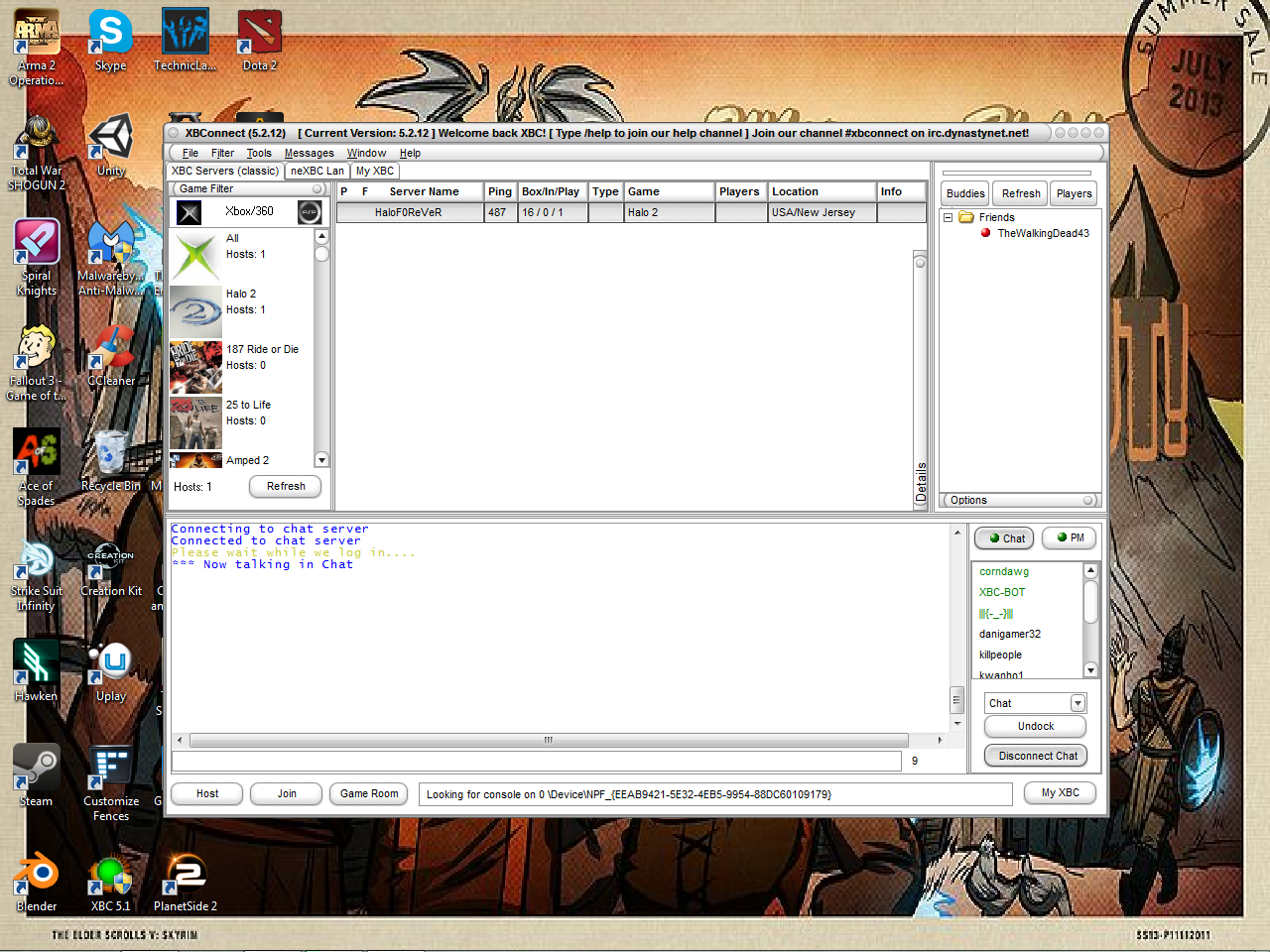
     XBConnects is another free program that emulates a xbox server.  XBConnects can be very useful when trying to relive the moments of playing Halo 2 on your xbox with other people across the world.  XBConnects can be very hard to figure out and setup since its designed to be for people who tend to know what their doing, but forums and youtube videos can help alot with figuring it all out.  
(XBConnects interface and page)
      Another thing XBC does is that it shows what games it supports and what servers are currently in use for those games.  My only complaint is that it takes a while to setup and learn, but will reward you with awesomeness of playing your favorite games from your childhood.